
Download TV Reader APK – News Reader App for Android TV Devices
Overview
TV Reader is a dedicated news reader application tailored for Android TV devices, designed to deliver a streamlined and distraction-free experience for consuming news content on large screens. Built on an RSS-based architecture, the app allows users to subscribe to custom news feeds or select from a range of preset channels, making it easy to access a variety of news sources. It is compatible with Android TV Oreo and later versions, and supports integration with the home screen as a dedicated channel, enabling quick access to current headlines.
The app’s primary purpose is to simplify news consumption on TV platforms, where traditional mobile or desktop apps are often less effective due to interface limitations. It is particularly useful for users who prefer reading news articles on a television screen, either at home or in shared spaces. The clean, readable interface ensures that content is displayed clearly, with minimal visual clutter.
The developer has positioned the app within the Education & Reference category, specifically under Magazines & Newspapers, indicating its focus on informational content delivery. While the developer’s background is not publicly detailed, the app’s functionality suggests a targeted approach to enhancing the Android TV user experience.
Key Features & Capabilities
- RSS Feed Integration – TV Reader supports both custom RSS feeds and pre-configured channels, allowing users to tailor their news sources to specific interests such as technology, politics, or sports.
- Home Screen Channel Compatibility – The app functions as a home screen channel on Android TV Oreo and later, enabling users to launch it directly from the main interface without navigating through menus.
- Full Article Display – When the RSS feed includes full article content, TV Reader renders it in a clean, readable format optimized for TV viewing, with adjustable text size and layout.
- WebView and External Browser Support – Users can open original articles within the built-in WebView or in any preferred external browser, offering flexibility in how content is accessed and viewed.
- Distraction-Free Reading Mode – The interface prioritizes readability by minimizing UI elements, ensuring a focused experience when reading news on a large screen.
These features collectively address common challenges faced by Android TV users when trying to access news content, such as poor readability, complex navigation, or limited content availability. For example, a user can set up a feed from a favorite news website and access it directly from the home screen, reading full articles without switching devices. The app’s support for multiple content delivery methods enhances usability, especially for users who want to verify information or view multimedia elements not included in the feed.
User Interface, Workflow & Performance
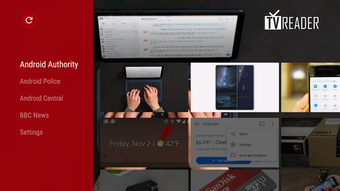
TV Reader features a minimalist user interface designed specifically for remote control navigation, with a focus on clarity and ease of use. The layout organizes news feeds into a vertical list, with headlines and summaries displayed in a clean, legible format. Navigation is intuitive, relying on directional controls and selection via the remote, which is standard for Android TV environments.
The workflow is straightforward: users can browse feeds, select an article, and choose to read it in the app’s built-in reader or open it externally. The app does not display advertisements or intrusive elements, preserving the clean reading experience. Performance observations are based on general software behavior patterns, as specific resource usage details were not provided.
The developer did not specify CPU or RAM usage, nor did they include benchmark data. However, the app’s lightweight nature, combined with its focus on text-based content, suggests efficient operation on standard Android TV hardware. Stability is expected to be consistent with typical Android TV applications, though no official reports on crashes or freezes were shared.
Overall, the app appears optimized for smooth interaction on TV platforms.
Compatibility & System Requirements
TV Reader is designed for Android TV devices running Oreo (8.0) or later. This ensures compatibility with modern smart TVs and streaming boxes that support the Android TV platform. The app is distributed as an APK file, indicating it is available outside the official Google Play Store, which may appeal to users who prefer sideloading or have access to alternative app repositories.
The installation size is not specified in the provided information. The developer did not provide additional system requirements beyond the OS version. As such, exact hardware specifications such as minimum RAM or processor speed are not available.
Compatibility information was partially provided, with the app’s functionality confirmed on Android TV Oreo and newer systems. Users of older Android TV versions may not be able to install or run the app. The lack of detailed system requirements means that performance on lower-end devices cannot be predicted with certainty.
Pros and Cons
Pros
- Free to download and use with no in-app purchases
- Optimized for Android TV with remote-friendly interface
- Supports both custom and preset RSS feeds
- Integrates as a home screen channel for quick access
- Offers full article reading and external browser options
Cons
- No official information on system requirements or resource usage
- APK distribution may raise security concerns for cautious users
- Limited to text-based content; no video or audio support
- Relies on RSS feed availability for full content
- Does not support offline reading or caching
FAQ Section
Is TV Reader compatible with all Android TV devices?
TV Reader is compatible with Android TV devices running Oreo (8.0) or later. Devices with older versions may not support the app.
Can I use TV Reader without an internet connection?
The app requires an active internet connection to fetch and display news feeds. It does not support offline reading or content caching.
Is TV Reader safe to download as an APK?
TV Reader is a free app available from trusted sources. However, since it is distributed as an APK, users should ensure the source is reputable to avoid potential security risks.
Does TV Reader support video or audio content?
No, the app is designed for text-based news reading. It does not support video or audio playback from feeds.
How often are updates released?
Update frequency is not publicly disclosed. Users are advised to check the official source regularly for the latest version.
Final Thoughts
TV Reader stands out as a focused, efficient solution for Android TV users seeking a simple way to stay informed through RSS-based news feeds. Its clean interface, home screen integration, and support for both custom and preset channels make it a practical tool for daily news consumption on large screens. While it lacks advanced features like offline access or multimedia support, its core functionality is executed well and remains relevant in the growing ecosystem of smart TV applications.
The app’s free status and minimal design further enhance its appeal. For users who value readability, simplicity, and direct access to news content on their TV, TV Reader offers a compelling experience. Download TV Reader now to enjoy a distraction-free way to read the latest headlines on your Android TV.







